Task
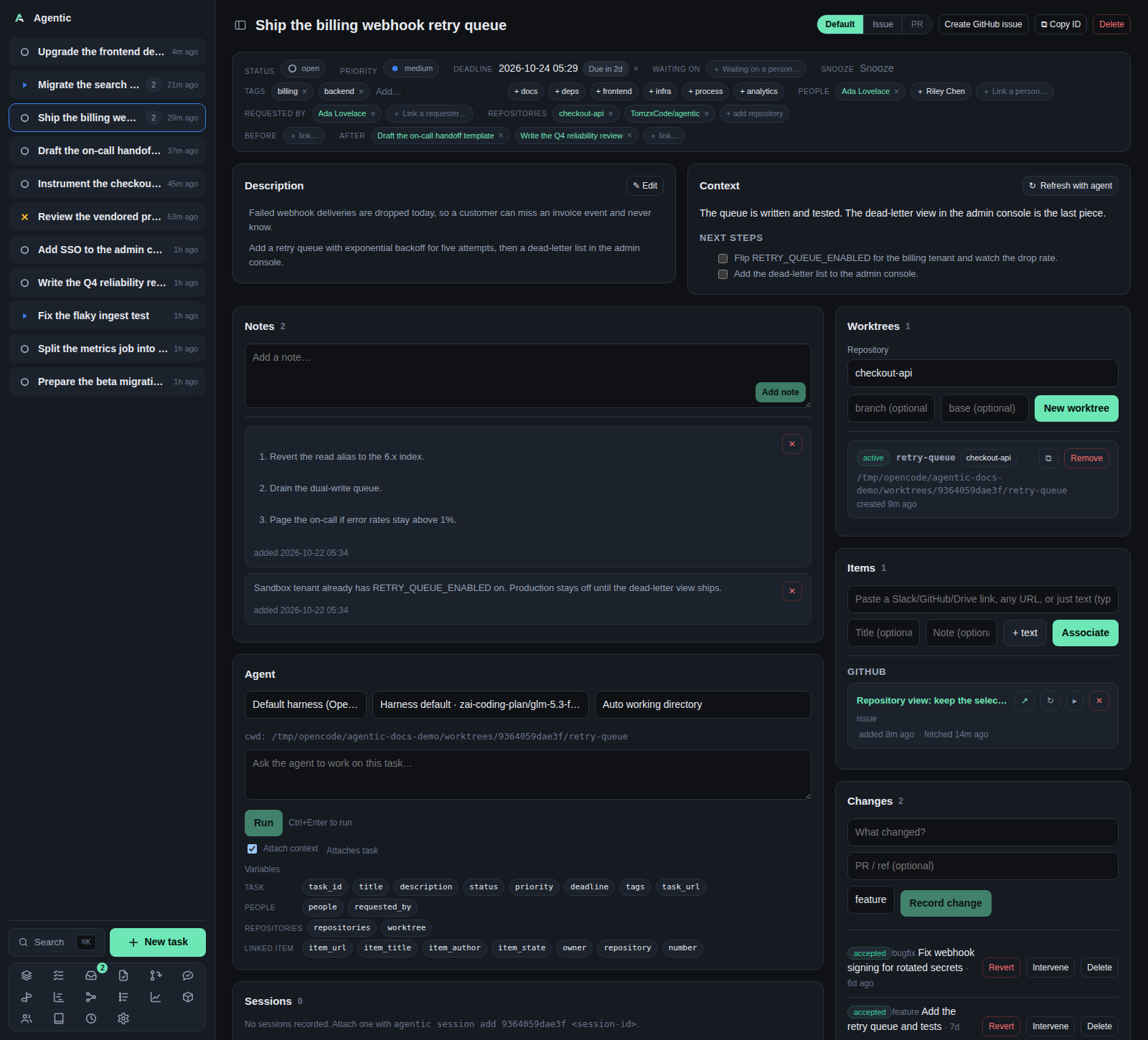
/task/:id is the working surface for one task: its description, its agent-maintained context, the evidence linked to it, the worktree the agent runs in, and every run, change, and event it accumulated.
Problem
Resuming a task means re-reading a dozen places: the issue, the Slack thread, the checkout, what the last agent concluded, what you decided to do next. The task page collects all of it so you can pick the work back up in under a minute. It is also the page that drives the agent, so the prompt, the worktree, and the transcript sit next to the context they are about.
How to use it
The head
- The title is editable: click it, press
EnterorF2, thenEnterto save andEscto cancel. - The view switch has three modes:
Default,Issue, andPR. A mode is disabled with a tooltip when the task links no item of that kind, and the mode is kept in the URL so a link can open straight into it. Create GitHub issueappears when the app has a registered repository with agithub.comremote. With exactly one GitHub repository linked to the task it creates immediately; otherwise it asks which one, offering the task's own repositories first, then every registered GitHub repository. The new issue is linked to the task as an item.- The newest run's session links sit in the head, where the command button reads
Resume; the fullCopy resume commandwith the command itself is in the Sessions panel. ⧉ Copy IDputs the task id on the clipboard.Deleteasks for confirmation and returns you to the list.
The properties panel
| Field | What you can do |
|---|---|
| Status, Priority | Pick a new value; it saves at once. |
| Deadline | Pick a date and time. Enter confirms, Esc cancels, clicking away without a change cancels. |
| Waiting on | Name the person you are waiting on and an optional check-back date. The task becomes Blocked and leaves the stack until the date passes or you clear the person. |
| Snooze | Park the task until a date without changing its status. It returns to the stack when the date passes. |
| Tags | Type and press Enter or , to add; Backspace removes the last one. |
| People | Link the people involved, including suggested people taken from the linked items' authors and commenters. |
| Requested by | Link whoever asked for the task. |
| Repositories | Link the checkouts the work touches. |
| Links | Link a task before or after this one, as related, or as a parent or child, and unlink with ×. The picker lists an already linked task in its Selected section, where tapping it unlinks it, and its Select all / Deselect all actions link every task the filter lists or clear the group. Each chip shows the linked task's current status icon next to its title. A related link is symmetric and has no ordering, so it reads the same from both tasks. Parent/child links form a separate hierarchy, and a task can have several of each. The API refuses a before/after or parent/child link that would close a cycle. |
The panels
| Panel | What it does |
|---|---|
| Description | Markdown body. ✎ Edit opens the editor; links and <details> inside it stay clickable. |
| Checklist | The items from the checklists that matched the task, the agent's proposed actions, plus your own. Tick one to complete it, drag the ⠿ handle to reorder them, click its text to rename it, + turns it into a child task, and ✕ removes it. A converted item stays, shows its task's status in front, and links to its task. An item whose checklist no longer matches stays visible but disabled. |
| Context | The agent-written summary. ↻ Refresh with agent starts a context run that also proposes actions for the task's checklist, skipping items already there or removed by hand. ↻ Name & summarize appears when a Slack item is linked. |
| Notes | Short notes, added with Add note or Ctrl/Cmd+Enter, edited in place, removed with ✕. |
| Items | Paste a Slack, GitHub, or Drive link (the source is inferred), add a title and a note, then Associate or press Enter in any field (Ctrl/Cmd+Enter in the pasted-content box). Each row can be refreshed, expanded, unlinked, marked Done or Reopen (Slack), and opens in ghx or slackx when those URLs are configured. |
| Changes | Record what changed and its class, then move it through Verify, Accept, Reject, Revert, or record an Intervene with a kind. |
| Worktrees | Create a worktree from one of the task's repositories, with an optional branch and base. ✎ opens it in your editor, ⧉ copies its path, Remove deletes it from disk after a confirmation. |
| People | The linked people and requesters, with a link to each person page. |
| Sessions | Agent sessions recorded against the task, including ones you attach by hand with agentic session add. |
| Timeline | The task's events with their client and actor, plus time spent in each status. |
| Agent | The harness picker, the model picker, the worktree picker, the Settings prompt buttons, the prompt box, the transcript, and the run history. |
The checklist
Checklists are defined in Settings → Checklists.
A template lists the rules that decide which tasks it applies to and the items it contributes.
A rule can match a task's status, priority, waiting-on person, tags, people, requesters, repositories, or its before/after/related tasks; every rule has to match.
The first time a task matches, the template's items are copied onto it.
Editing the task later never duplicates them.
If a rule stops matching, the items stay, disabled, so the record of what was done is not lost.
Drag an item's ⠿ handle to move it, or focus the handle and press ↑ / ↓.
Add at the bottom of the panel adds an item to this task only.
Refresh with agent adds the agent's proposed actions to this task's checklist: an item already present is not duplicated, a completed item keeps its state, and an item you removed is not proposed again unless you add its text back.
Apply now in Settings adds any missing items from a template to the tasks it currently matches.
+ converts an item into a full task: the item links to the new task and keeps its own done state, and the new task appears under this task's children links.
A converted item shows its task's status in front of the item, and choosing a new status there changes the task.
Moving the task to done also marks the item done; moving it back out of done leaves the item alone, so its own state stays the record of the step.
The converted item's text shows the task title, so editing it renames the task.
The new task inherits the parent's group, harness, and repositories, and picks up any checklist templates it matches.
The agent panel
The harness picker defaults to the harness marked default in Settings.
The model picker lists what that harness's ACP session offers and defaults to the harness's own model, so a single run can answer with a different model without changing the harness.
The worktree picker decides the working directory; Auto uses the task's worktree, then its first repository.
Prompt buttons come from Settings → Agent prompts and appear only when the task links exactly one item of the button's kind.
Ctrl+Enter in the prompt box runs the prompt.
The Attach context checkbox appends the task and its linked items after the message, separated by ---, unless the message is a command starting with $ or /.
The variable chips insert {task_id}, {owner}, {number}, {li.a.item_url}, and the rest at the cursor.
History reloads an earlier run's transcript; a queued or running run follows its stream.
Issue and PR modes
When the task links more than one issue (or more than one pull request), the mode opens with a list of them and no item panel; selecting one replaces the list with that item's panel, a back control returns to the list, and the page stays on the task throughout. Pull requests use the My PRs table: PR, Status, Review, Reviewers, Checks, Comments, Conflicts, Issue, Description, Blocker, and Updated, and clicking a row opens that pull request in the task. Issues keep a compact row with the issue's number, title, and state. The selection is in the URL (?view=pr&item=owner/repo/7), so the back button returns to the previous item and a link can open straight into one. A single link skips the list. The list and its state come from one GET /api/github/task/{id} read, which reads each linked item from GitHub and fills each pull request's merge facts (status, reviewers, checks, open comments, conflicts, readiness).
Issue shows the panel for the selected issue and one agent panel scoped to it.
PR shows the selected pull request with its merge-readiness light, the reviewed commit, a Refresh, a cell per review step, a Surfaces cell for the conditional surface reviews, and the findings selector. Its list row states the pull request's status (open, draft, merged, or closed), whether an individual reviewer (not only a team) is assigned, whether its checks pass, how many inline comments are still open, whether the branches conflict, and whether it is ready to merge.
A Description / Review / Reports / Feedback switch sits under the pull request's title: Description shows the body, Review shows the step cells and the findings selector, Reports shows one tab per step that wrote a report (Behavior, Risk, Adversarial, Coverage, Validate, Verify, Review, plus CLI, SDK, API, and DB for the surface reviews that ran), with the selected report read in place instead of a modal, and Feedback shows the analyzed reviewer comments that pull request has in the PR feedback store, with the same decision cards. Reports and Feedback appear only when the pull request has something for them.
The header's Comment opens a box that posts a top-level comment on the pull request, and ✓ Approve submits an approving review after a confirmation that takes an optional review comment. Approval is offered on an open, non-draft pull request GitHub has not already approved; the panel then marks it Approved for the session, while GitHub's own review decision stays what it reports.
Clicking a cell switches to the reports pane on that step's report.
The standalone pull request page uses the same panel, so it has the same switch.
Share picks the must, should, and may findings and hands the selection to an agent run, which posts the review comments.
The findings are read from each review step's own state file under the pull request's directory (review.yaml, validate.yaml, verify.yaml, and <skill>.yaml for the rest), not from the Markdown reports.
A Sources row above the list narrows what is shown (All shows every step, None hides them all); it writes no decision, and a finding hidden this way stays selected and is still shared.
Each check writes include or skip onto that finding, and the app itself posts nothing to GitHub.
Good to know
- The page reloads on task-stream events, so a run that finishes elsewhere updates here.
- A failed GitHub read falls back to the stored copy and says so on the panel.
- Removing an item does not ask for confirmation; removing a worktree, session, change, and task all do.
CLI and agent interface
| Operation | CLI | HTTP |
|---|---|---|
| Read, update, delete the task | agentic task get/update/delete |
GET/PATCH/DELETE /api/tasks/{id} |
| Timeline | agentic task timeline <task> |
GET /api/tasks/{id}/timeline |
| Context | agentic context get <task>, agentic context refresh <task> |
GET /api/tasks/{id}/context, POST /api/tasks/{id}/context/refresh |
| Link an item or a URL | agentic link add <task> --url … --item-id … |
POST /api/tasks/{id}/items |
| Refresh, finish, or reopen an item | agentic item refresh/done/reopen <item> |
POST /api/items/{id}/refresh, PATCH /api/items/{id} |
| Links | agentic task link/deps/unlink |
GET/POST/DELETE /api/tasks/{id}/dependencies |
| Convert a checklist item | agentic task convert <task> <item> |
POST /api/tasks/{id}/checklist/{item_id}/convert |
| People and requesters | agentic person link <person> --task … --requested-by … |
POST /api/tasks/{id}/people, /requesters |
| Changes | agentic change create/verify/accept/reject/revert/intervene |
POST /api/changes, POST /api/changes/{id}/status, /interventions |
| Worktrees | agentic worktree create/list/remove |
GET/POST /api/tasks/{id}/worktrees |
| Runs | agentic run create/list/events/cancel/stream/wait |
GET/POST /api/tasks/{id}/runs, GET/POST /api/runs/{id}/… |
| Sessions | agentic session add/list/get/update/remove |
GET/POST/PATCH/DELETE /api/tasks/{id}/sessions |
| A model for one run | agentic run create <task> --prompt "…" --model <model> |
POST /api/tasks/{id}/runs with model |
| Create a GitHub issue | none | POST /api/github/issues |
| Name and summarize | none | POST /api/tasks/{id}/summary/refresh |
| Review report and findings decisions | none | GET /api/reviews/report/…, POST /api/reviews/findings/{n}/decisions |
The CLI is the supported route for an agent: every write on this page except the three API-only rows has a command.
An agent should pass --api-url explicitly, because the client does not read AGENTIC_API_URL.
Related
- Concepts for the nouns on this page.
- How agents are wired for the queue and the ACP session.
- How to run an agent against a task.
- Configure session links.
- Review queue for the same PR panels scoped to one repository.