Graph
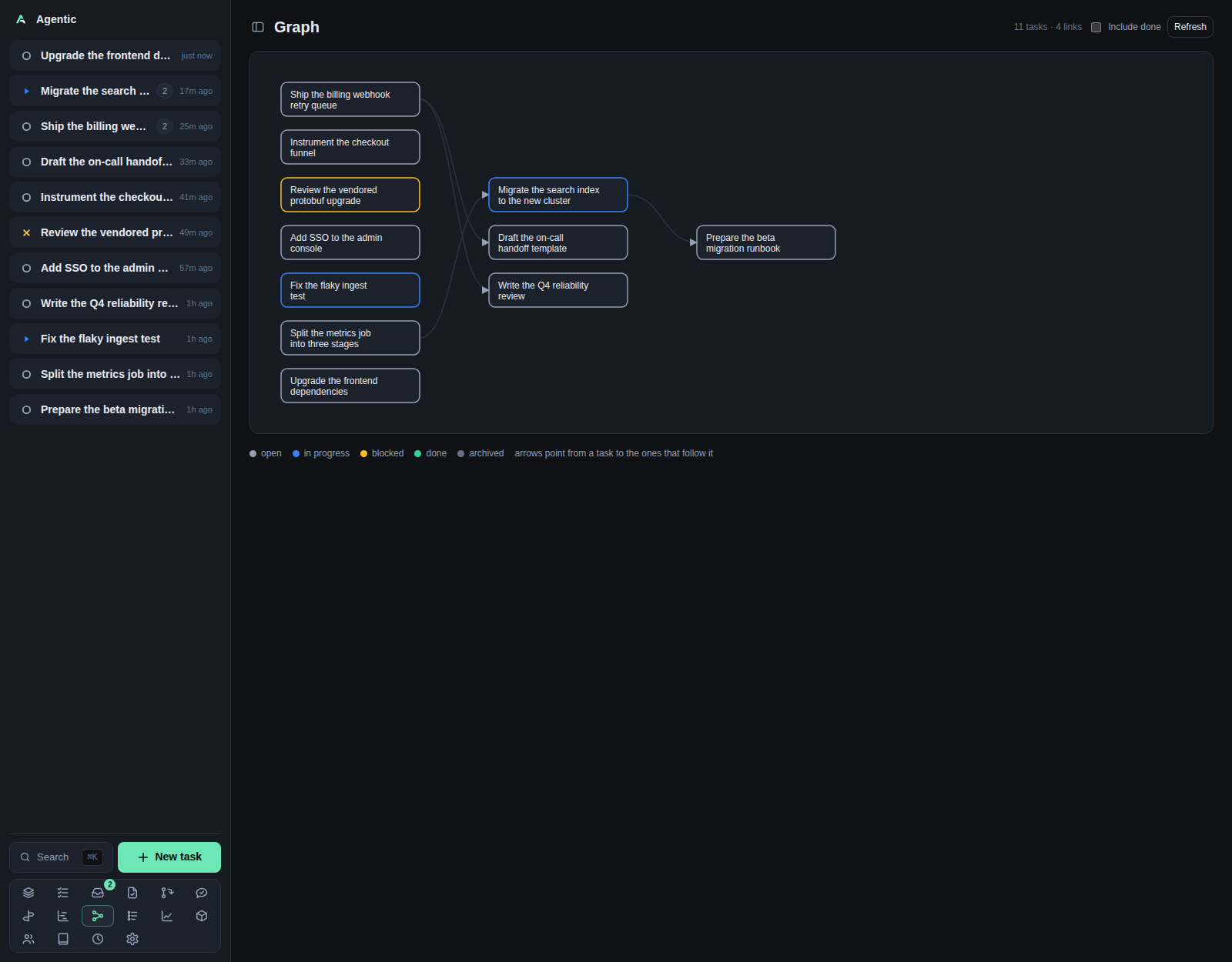
/graph draws the before/after dependency graph as columns, so prerequisites sit left of the work that follows them.
Problem
Dependencies between tasks are easy to link and hard to hold in your head, especially when a chain is several levels deep. The graph lays every task out in layers by longest path, with arrows from a task to the tasks that follow it, so a blocked chain is visible as a pattern rather than a list. Cycles cannot exist: the API refuses a link that would close one.
How to use it
The page
The header reads Graph with N tasks · M links, an Include done checkbox, and Refresh.
The panel holds a scrollable SVG. Each node is the task's title, wrapped to three lines, and clicking it opens the task page. Columns are layers: a task with no prerequisites sits in the first column, and a task that follows another sits one column to its right. Columns are centred vertically, and the whole graph scrolls sideways when it is wider than the page.
The legend lists open, in progress, blocked, done, and archived, and states that arrows point from a task to the ones that follow it.
Controls
| Control | What it does |
|---|---|
Include done |
Adds done and archived tasks. Off by default, reloads on change. |
Refresh |
Reloads the graph. |
| Node | Opens the task page. |
There is no zoom, no pan control, no persistence, and no keyboard navigation. Scrolling is the only way around a large graph.
Good to know
- A link to a task hidden by the filter is dropped from the drawing, so the graph thins out as you filter rather than showing holes.
No tasks to show. Link a task's dependencies to build the graph.means the filtered set is empty.- Editing dependencies happens on the task page, not here.
- Only
before/afterlinks are drawn. Arelatedlink is symmetric and does not appear in the graph. - Nothing polls; the graph loads on mount and when you change the filter or press
Refresh.
CLI and agent interface
| Operation | CLI | HTTP |
|---|---|---|
| Read the whole graph | agentic graph, or agentic graph --include-done |
GET /api/graph?include_done=true |
| Read one task's neighbours | agentic task deps <task> |
GET /api/tasks/{id}/dependencies |
| Link two tasks | agentic task link <task> <other> --relation before |
POST /api/tasks/{id}/dependencies |
| Unlink two tasks | agentic task unlink <task> <other> |
DELETE /api/tasks/{id}/dependencies/{related_id} |
--relation before means the other task must be done first; omitting it makes the other task follow.
The endpoint returns nodes and edges, which is everything an agent needs to reason about the order without the drawing.
Related
- Tasks and Task for the dependency chips that create these links.
- Gantt for the same tasks on a time axis.
- CLI reference for
agentic graphandagentic task link.