Settings
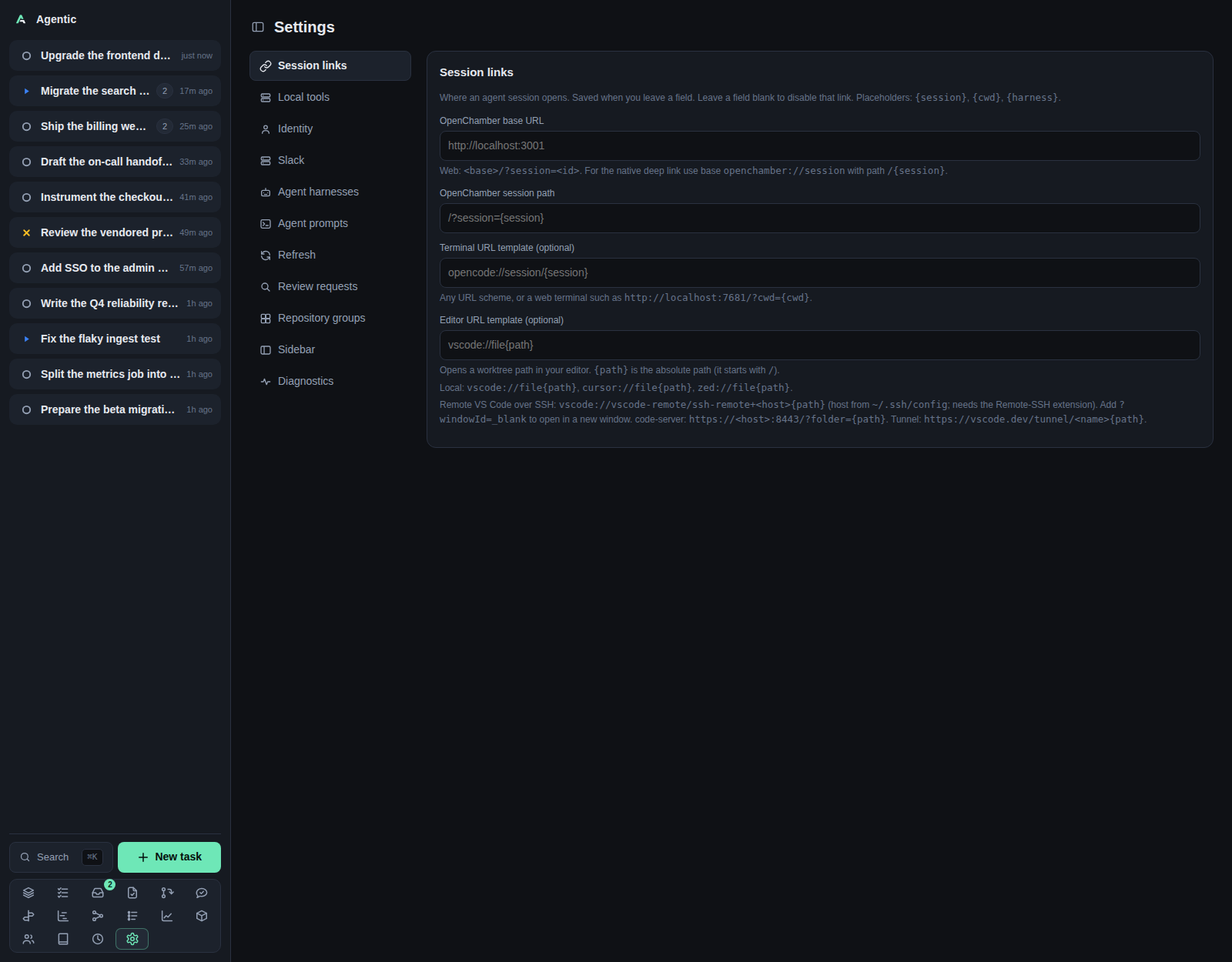
/settings configures how the app reaches external tools, agents, and Slack, without editing environment files.
Problem
Most of what the app needs is a credential or a URL that changes per machine: which harness to run, where OpenChamber lives, which GitHub login counts as you, how often to re-fetch items. The Settings page collects those, shows the value in effect, and saves an override that wins over the environment variable. Each section keeps its own draft, so editing one never touches another.
How to use it
The page is a left nav of sections and a right panel.
The chosen section is kept in the ?section= query, so a section is linkable and the command palette can jump straight to it.
All sections stay mounted, so switching back and forth does not lose what you typed.
| Section | What it edits |
|---|---|
Session links |
The OpenChamber base URL, the OpenChamber session path, the terminal URL template, and the editor URL template. |
Local tools |
The ghx and slackx web UI base URLs. |
Slack |
The Slack recipient ids, the bot token, Send test notification, and the Slack thread refresh policy. |
GitHub |
The GitHub login that counts as you, the GitHub issue/PR refresh policy, the ghx cache refresh cadence, and which repositories the review scan considers. |
Agent harnesses |
Per harness: its resume command, its model, and which harness is the default. Also adds a harness. |
Agent prompts |
The prompt buttons the agent panel shows, their item kind, their label, and their template. |
Checklists |
Reusable task checklists and the rules that decide which tasks they apply to. |
Review requests |
Scan now, the SLOs, and the last scan's result. |
Repository groups |
Named sets of repositories, with a description. |
Sidebar |
The sidebar's layout (full or icon rail), and which pages it shows and in what order. |
Debug bar |
Whether the bar pinned to the bottom of every page is shown. |
Diagnostics |
Read-only presence, version, path, and cache statistics for every external command and harness. |
Session links
OpenChamber base URL and OpenChamber session path combine into the Open in OpenChamber link; the path defaults to /?session={session}.
Terminal URL template (optional) takes {session}, {cwd}, and {harness}.
Editor URL template (optional) takes {path} and drives the worktree Open in editor button, for example vscode://file{path}.
Fields save when they lose focus, and the panel shows saving… then saved.
Local tools
ghx server URL and slackx server URL are the base URLs of ghx serve and slackx serve, not their RPC endpoints.
When one is set, GitHub and Slack items gain an Open in ghx or Open in slackx link.
Leaving a field blank hides that link.
A tool on the managed transport has no URL field: the server starts that tool's serve process itself, so the page shows a link to its web UI with the port the process actually bound (a configured URL keeps its host, since that is how you reach this machine), and whether the process is running.
The process listens on all interfaces, so the same port works from another machine.
Slack
Slack user id is the default recipient; Slack events user id and Slack events channel override it per use.
Slack bot token posts as a bot instead of as you, and Send test notification posts one message and reports the result or Slack's error.
The item poke action still uses SLACK_TOKEN, not the bot token set here.
Slack threads is a refresh policy: a comma-separated list of age=interval bands with an optional * fallback.
The preview re-parses what you type after a 300 ms pause and shows the resulting schedule.
Force refresh re-fetches every Slack item immediately.
The status line reads Last run: <age> · N refreshed · M failed · forced · N refreshed in the last 24h, and an empty policy disables the source.
GitHub
Your GitHub login is who counts as you: a merged pull request this login authored and a task links becomes a change, and the inbox and repository views only offer to record changes for its pull requests.
Blank falls back to the authenticated gh account, which the placeholder shows when it can be detected.
GitHub issues/PRs is the same kind of refresh policy as the Slack one, with its own preview, status line, and Force refresh button.
GitHub cache refresh is the cadence of the one background job that runs ghx cache over the registered GitHub repositories, a duration such as 15m or 1h; blank stops it.
It is the only place the cache is refreshed: every page reads it, so this cadence is how fresh the GitHub pages are.
A repository is refreshed with a delta when ghx already has a completed cache for it, and with a full history walk when it does not.
Repositories with no policy of their own chooses whether the review scan includes a repository that has no policy of its own: Include (scan every repository except the excluded ones) or Exclude (scan only the repositories marked include).
Each repository then has its own Default, Include, or Exclude.
The per-repository choice saves when it changes, as a PATCH on that repository, and the review scan under Review requests follows it.
Agent harnesses
Each harness card shows whether it is the default, whether its command is on PATH, and its status.
Resume command renders the Copy resume command button and takes {session}, {cwd}, and {harness}.
Model selects the model over ACP; blank means the harness's own default, shown as the placeholder.
Set default makes that harness the one a task or run uses when it names none.
The create form takes Name, command, args, and an optional model.
Deleting a harness is CLI-only (agentic harness delete).
Agent prompts
Each row is a prompt with an item kind (issue or pull_request), a label, and a template.
The template uses the task and item variables listed in Configuration.
Add prompt appends a row, ✕ removes one, and Reset to defaults restores the two seeded prompts, Review PR and Triage issue.
A prompt appears in the agent panel only when the task links exactly one item of that kind. Every edit saves the whole list, and a row with an empty template is skipped until you fill it.
Checklists
A checklist template has a name, an optional description, a set of rules, and a list of items.
A rule matches one task property: status, priority, waiting-on person, tags, people, requesters, repositories, or before/after/related tasks.
Every rule has to match.
Add rule appends a rule, ✕ removes one, and the items are one per line.
When a task matches, its items are copied onto the task once.
Apply now adds any missing items to the tasks that currently match, which is how a newly added item reaches tasks that already had the checklist.
Removing a template also removes the items it put on tasks; the task page keeps the items when a rule stops matching, shown disabled.
Review requests
The scan runs after each successful GitHub cache refresh, so its cadence is the GitHub cache refresh one under GitHub.
Scan now runs one pass immediately, and the section shows when the scan last ran, how many it found and kept, and any error.
The scan reads ghx's cache, so a repository ghx has never cached is not scanned.
Which repositories it considers is set under GitHub.
Review SLO is how long a pull request may await your review before the inbox flags it, such as 8h or 1d; blank turns it off.
Review nudge SLO is how long a pull request of yours may wait without any review from anyone before the inbox offers to poke its reviewers, such as 1h30m or 1d; blank turns it off.
Review auto-poke is a comma-separated list of absolute ages at which to DM those reviewers without waiting for the inbox: 24h,26h,28h pokes at those ages and stops.
A last entry with + repeats: without ~ it stays on the SLO's own clock (24h+1h, now+1h, next+1h), and with ~ it waits that interval after each poke (24h+~1h, now+~1h, next+~1h).
now+ pokes immediately, while next+ skips the immediate poke and uses the next boundary (or, with ~, one interval from now).
The ages count from when the pull request was last marked ready for review, or from when it was opened if it never was a draft; blank turns auto-poking off.
Auto-poke message is the DM text. It defaults to :wave::robot_face: I would love your review on this PR: {link} and accepts {link} (the pull request as a Slack link), {url}, {title}, {slo} (the age that triggered the poke, such as 1d), and {elapsed} (the pull request's age since it was opened or last marked ready for review, such as 1d 6h).
Poke message is the same for a manual poke; its {slo} is the review nudge SLO, and a blank uses the same default.
Both SLOs accept a combination of units (1h30m).
The queue the scan feeds is the Review queue.
Repository groups
A group is a name, a description, and a set of repositories.
Picking one on a task tells the agent which checkouts may hold information about it.
Remove asks for confirmation and leaves the tasks that use the group working, just without a group.
Sidebar
Layout switches between Full (the task list above the page icons) and Icon rail (a thin column holding only the page icons, spread over the sidebar's full height).
On a phone below 760px the rail becomes the drawer: opening the sidebar shows a narrow 56px strip of icons instead of the full-width task list.
It is per device, under agentic.sidebarLayout.
Each page has a checkbox, and each row has a drag grip and ArrowUp/ArrowDown to move it.
Reset to default appears once you have changed something.
This preference is per device, under agentic.sidebarNav, and never reaches the server.
Debug bar
Show the debug bar turns the bar pinned to the bottom of every page on or off.
While it is on, the bar summarizes the API calls and database queries the page has made, and Show details opens the request log by tab (API, DB, CLI, RPC) above the page's load timings: page load, DOMContentLoaded, TTFB, and first paint.
With the bar off, the page's bottom padding shrinks back to its normal gap.
This preference is per device, under agentic.debugBarHidden, and never reaches the server.
Diagnostics
Three groups: Runtime, Helper tools, and Agent harnesses, each row showing whether the command is installed, whether it is required, its version, and the path it resolved to.
Below them, the ghx cache table (issue and pull request counts, cache age, staleness, and per-operation hit rates) and the slackx cache table (workspace, path, and entity counts with when each was last updated).
Recheck probes again.
Version probes time out after 5 seconds and cache listings after 30.
Good to know
- A stored override wins over the matching environment variable; clearing the field falls back to the default.
- The section that writes through another endpoint is
GitHub: a per-repository review-scan policy is aPATCHon that repository. - The buttons that act rather than save a value are
Send test notification,Force refresh,Scan now,Set default,Add harness, andRecheck. - The page loads settings and repositories once; each section seeds its own editable copy from the overrides.
CLI and agent interface
| Operation | CLI | HTTP |
|---|---|---|
| Read effective settings and overrides | agentic settings get |
GET /api/settings |
| Set a link template or refresh policy | agentic settings set --openchamber-url … --terminal-url-template … --slack-refresh-policy … --github-refresh-policy … |
PATCH /api/settings |
| Preview a refresh policy | none | POST /api/settings/refresh-policy/preview |
| Refresh status per source | agentic settings refresh-status |
GET /api/settings/refresh-status |
| Force a source refresh | agentic item refresh-source github |
POST /api/items/refresh-source/{source} |
| Harnesses | agentic harness list/create/update/delete |
GET/POST/PATCH/DELETE /api/harnesses |
| Set the default harness | none | PATCH /api/harnesses/{id} with is_default |
| Diagnostics | none | GET /api/settings/diagnostics |
| Repository groups | none | GET/POST/PATCH/DELETE /api/groups |
| Review scan | none | GET/POST /api/reviews/scan |
| Repository scan policy | none | PATCH /api/repositories/{id} with review_scan |
| Send a test Slack notification | none | POST /api/slack/test |
agentic settings set covers only the link templates and the two refresh policies.
The GitHub login, the Slack ids and token, the local tool URLs, the agent prompts, the review-scan settings, the sidebar and debug bar choices, and every diagnostics probe are UI or HTTP only, so an agent that needs them has to call the API directly.
Related
- Configuration for every environment variable and the settings they override.
- How to configure session links.
- How to refresh items on a schedule.
- Review queue for what the scan produces.
- Repositories for the checkouts the groups collect.