Repositories
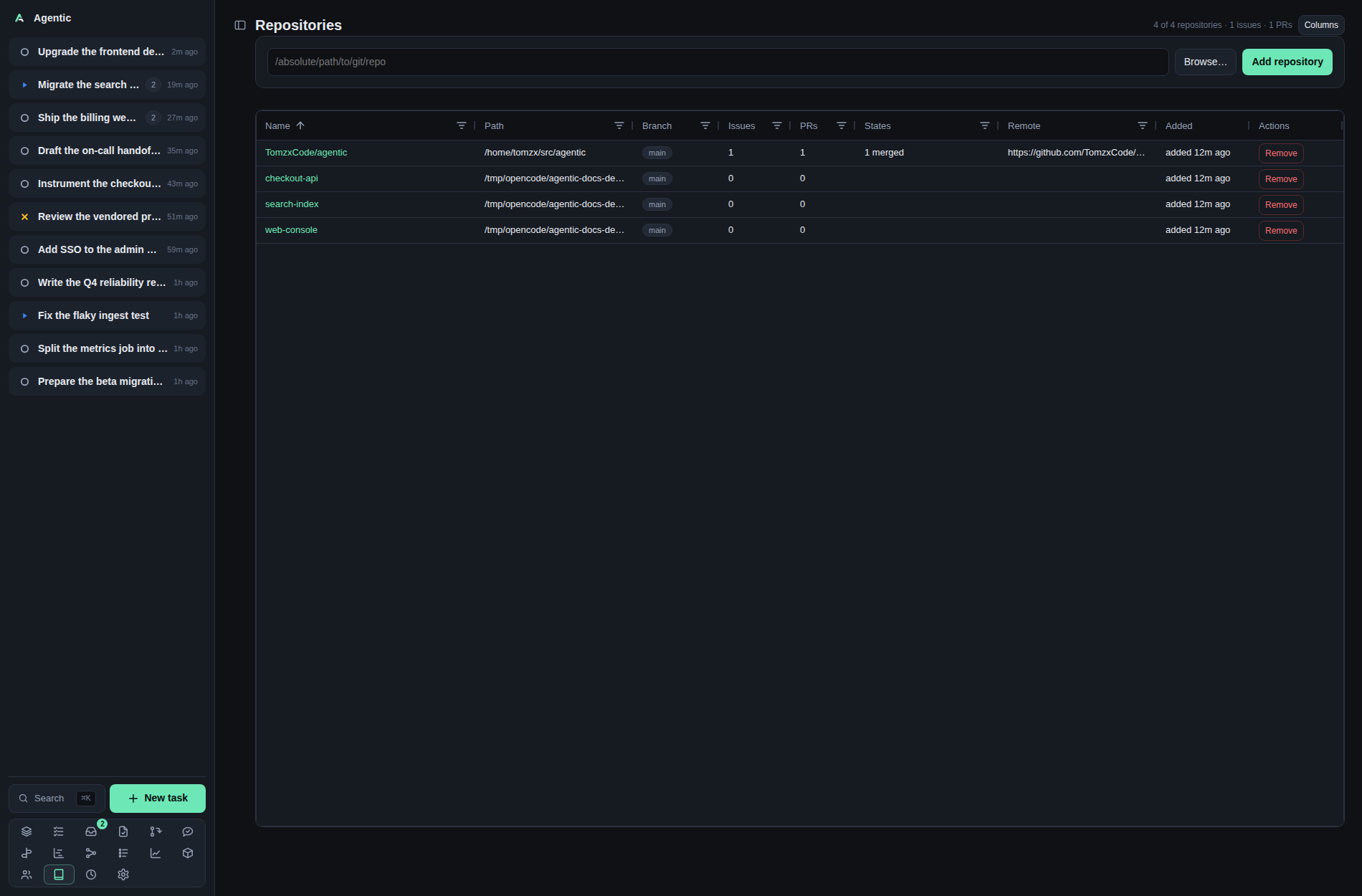
/repositories registers the local git checkouts Agentic works in, and /repositories/:id shows one repository's GitHub issues and pull requests overlaid with what is already linked to tasks.
Problem
Agent work needs a checkout, and the issues and pull requests worth working on are spread across the repositories you have cloned. Registering a checkout tells Agentic where a task's worktree comes from, and the repository page answers "what is open here, which of these already has a task, and which merged pull request still has no change record".
How to use it
The list (/repositories)
The header counts repositories, issues, and pull requests (N of M repositories · X issues · Y PRs), and + Add repository opens the add controls; Refresh re-reads each checkout's origin and updates any changed remote or derived name; Columns opens the column chooser, remembered on this device under agentic.gridColumns.repositories.
| Column | What it shows |
|---|---|
Name |
A link to the repository page. It is owner/repo when origin is a GitHub remote, and the folder name otherwise. |
Links |
A ghx link when the ghx URL is configured and a gh link to the repository on GitHub when origin is a GitHub remote. |
Path |
The checkout on disk. |
Branch |
The repository's default branch, with a multi-select filter. |
Issues, PRs |
Counts, with number filters. |
States |
A short summary such as 3 open · 1 merged. |
Remote |
The git remote URL. |
Added |
When the repository was registered. |
Actions |
Remove, which asks for confirmation and deletes no files. |
The counts come from the items already linked to tasks whose URL matches the repository's remote, not from a live GitHub read.
Adding repositories
The add controls stay hidden until you press + Add repository in the header.
Type an absolute path in /absolute/path/to/git/repo and press Enter, or use Browse….
The controls close once a repository is added; Cancel (or the header button again) hides them without adding anything.
Browse… opens the server-side directory picker, which browses from AGENTIC_FS_ROOT (~ by default) and refuses to leave it.
In the picker: ↑ Up goes to the parent, a folder opens with open ›, Select this folder takes the current one, show hidden reveals dot folders, and each row has a checkbox.
Add N folder(s) registers everything you ticked.
Git repositories are badged git and paths already registered are disabled and badged added.
The result toast reads Added N repositories, or Added N, M skipped (not a git repository) when some paths were not checkouts.
One repository (/repositories/:id)
The head shows the repository name, its default branch, the remote URL, Open in ghx, Reload, Refresh linked, and Columns.
The grid has one row per issue and pull request:
| Column | What it shows |
|---|---|
Kind |
issue or PR, with a value filter. |
# |
The number, with a number filter. |
Title |
The title, linking to the app's issue or PR page, with how long ago it was fetched. |
Links |
A ghx link when the ghx URL is configured and a gh link to the item on GitHub. |
State |
The state, with a value filter. |
Author |
A person link, or a grey link to create the person. |
Tasks |
The tasks already linked to this item. |
Task status |
The statuses of those tasks, with a value filter. |
Changes |
The change records that reference it. |
Actions |
New task or Record change. |
Row actions:
New taskappears on an unlinked row with a URL. It imports the issue or pull request into a new task, links it as an item, and stays on the page with the toastTask created.Record changeappears only when the row is merged, exactly one task links it, no change references it yet, and you authored it. It creates the change already accepted and dated to the merge.
Reload re-reads the repository's issue and pull request listing from ghx's cache and writes the listing state back onto the items linked to tasks.
The cache is refreshed by one background job (Settings → GitHub, ghx_cache_refresh_interval), never by this page, so Reload never waits on a GitHub fetch.
Refresh linked re-fetches only the items tasks already use, four at a time, and reports how many succeeded and failed.
Good to know
- Rows arrive newest number first, and every column header sorts and filters.
- Loading the list (or pressing
Refresh) re-reads each checkout'soriginand takes a changed URL, so a checkout that gained or retargeted its remote reads correctly without being removed and re-added. A name that came from the old remote, or a folder name left on a checkout whose GitHub remote is known, is repaired toowner/repo; a name set by hand stays. A checkout that was deleted, or whoseoriginis gone, keeps the values already stored. - ghx's own cache serves every visit; the background job keeps it current, so a changed issue or pull request shows after the next pass.
- A GitHub read failure keeps the items already linked to tasks and shows a banner saying so.
- The review-scan policy per repository is not edited here; it is a select in Settings → GitHub.
- Bulk add is API-only; the picker is the only UI for it.
CLI and agent interface
| Operation | CLI | HTTP |
|---|---|---|
| List repositories | agentic repository list |
GET /api/repositories |
| Add one | agentic repository add /path/to/repo |
POST /api/repositories |
| Add several | none | POST /api/repositories/bulk |
| Remove | agentic repository remove <repository> |
DELETE /api/repositories/{id} |
| Browse directories | none | GET /api/fs/list?path=… |
| List a repository's issues and PRs | none | GET /api/github/repository?repository_id=… |
| Create a task from an issue or PR | agentic task create --github-url <url> |
POST /api/tasks with github_url |
| Record a merged pull request | agentic change create <task> --external-ref <url> then agentic change accept <change> |
POST /api/changes |
| Set the review-scan policy | none | PATCH /api/repositories/{id} with review_scan |
| Group repositories | none | GET/POST/PATCH/DELETE /api/groups |
An agent can register a checkout and turn an issue into a task, but it cannot read the repository's GitHub listing or run the two refresh actions without calling the HTTP API directly.
Related
- Items for the item each grid row corresponds to.
- Review queue for the pull requests awaiting your review.
- Settings for the review-scan policy and repository groups.
- How to create and remove worktrees.
- HTTP API for the repository endpoints.