How to read the review queue
Problem
You want one place that shows which pull requests still need your review and what each review step concluded, whether or not a review has run against a pull request yet.
Prerequisites
- A running API and the web app open (see the tutorial).
ghxon yourPATH: the queue reads each pull request's own fields (title, state, author, age) from it, the review scan searches its cache (including the team membershipsghx cacherecords), and a pull request item's reviewer list comes from it too.- The repositories you want scanned cached by
ghx: the scan reads that cache, not GitHub directly. The app's background cache job warms the registered repositories on its cadence (Settings → GitHub); a manualghx cache --repo owner/namealso works. - Review reports in the store for the pull requests you have already reviewed.
Run
/review-pr-full(or the individual review skills) on a PR to write them.
The reports live under AGENTIC_SDLC_DIR (~/.sdlc by default), at {owner}/{repository}/pull-requests/.
Steps
- Open the Review queue page (the
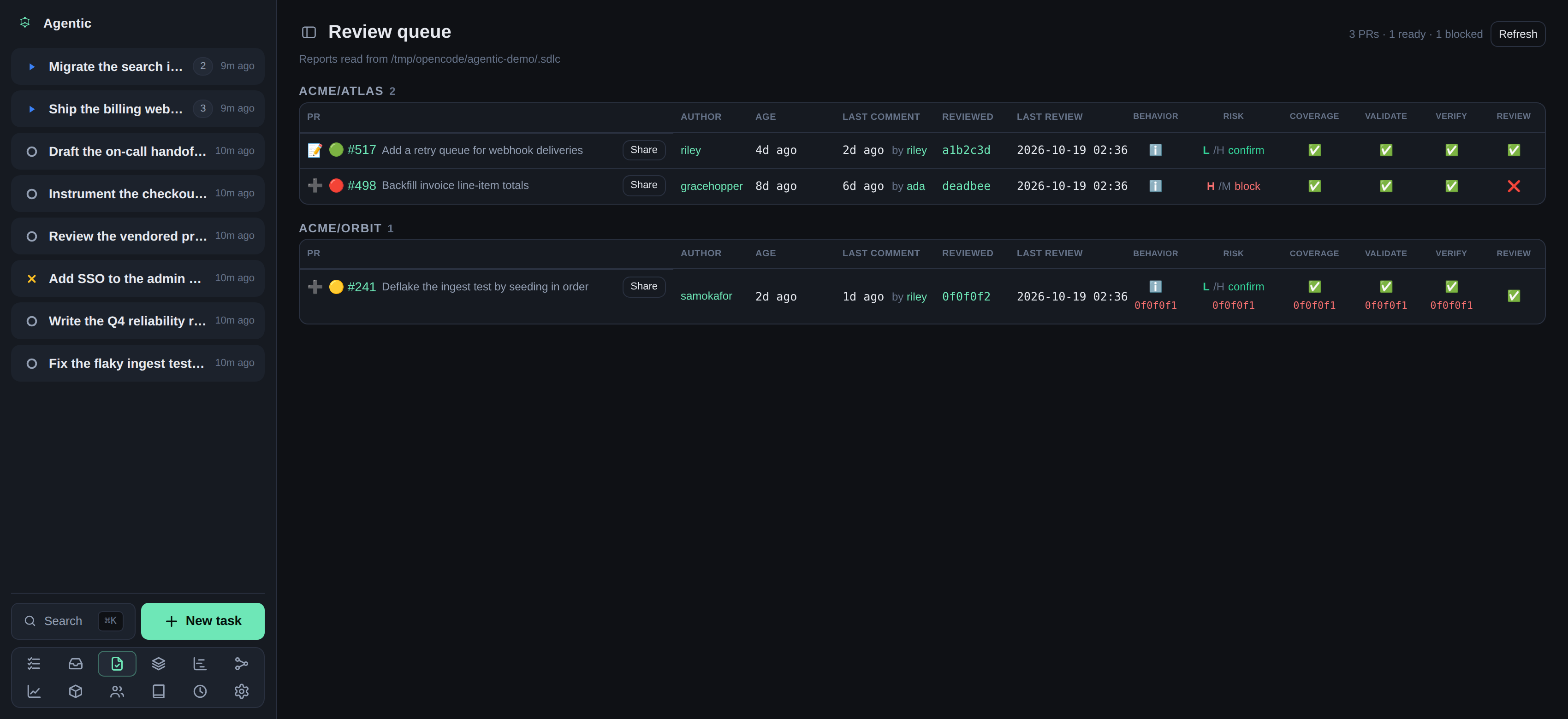
/reviewsroute). Each row is one pull request: those with review reports in the store, plus the ones the review scan found awaiting your review. Grouped by repository, newest first.
- Filter the queue. By default it shows only open pull requests; a pull request whose state could not be read is treated as open. The status chips (Open, Merged, Closed, All) each carry a count over the whole queue, and the header totals follow what the filter shows. The Drafts, Approved, and Reviewed chips each carry a count over the whole queue and step through three states on click: hidden, only (keep just that kind), and all (keep everything); the chip shows its current state. Drafts and approved pull requests start hidden, since neither waits for a review; pull requests you already reviewed start all, since they may still need a follow-up. When one of them hides the only matching rows, the empty state says how many are hidden and offers to include them. When only one kind is shown and nothing matches, the empty state offers to show every pull request. Use the All repositories dropdown to pick one or more repositories; type in its filter box to narrow the list, and each choice toggles on and off. With nothing chosen it shows every repository, and the queue keeps only the rows of the chosen ones. Use the All authors dropdown the same way to pick one or more authors. At the top of either list, Select all takes every option the filter box currently lists and Deselect all clears the choice. Type in the search box to narrow by repository, number, title, or author. The status, drafts, repository, author, and search filters are remembered on this device, so leaving the page and coming back keeps them. When nothing matches, the empty state offers to clear the search, repositories, or author, or show all statuses.
- Read the row's own columns: the pull request number and title, its author, its age, the last comment and who made it, the commit last reviewed, and when the last review ran. Click the number to open the pull request on GitHub. A ✅ after the number means GitHub has already approved the pull request (the reviews its branch requires are in), so it needs no further review from you. A 📨 means a review is requested from you, and 👀 means you already reviewed the pull request and it is still open. A tint across the whole row and a colored edge on its first cell mean the pull request has awaited your review for longer than the review SLO; hover the edge to read why, with the wait and the SLO. The header counts the highlighted rows.
- Read the merge-readiness light beside the number:
- 🟢 green: the collected signals could be approved automatically.
- 🟡 yellow: something still needs attention.
- 🔴 red: a signal blocks approval.
- Read the per-step columns, one per review step: Behavior, Risk, Adversarial, Coverage, Validate, Verify, and Review. A cell is tinted by the step's verdict (green pass, red fail, amber needs a decision, blue informational) and carries no verdict text, and a report that does not cover the newest reviewed commit shows the commit it covers in red underneath. A step that is running right now shows a spinner instead, and its tooltip says when it started; the spinner appears even before the step has written a report. A step with no report shows a dash. Surfaces folds the four conditional surface reviews into one cell: one token per surface that ran (CLI, SDK, API, DB), each tinted by its own verdict and opening its own report. A surface the diff did not touch leaves no token and is not counted as stale.
- Click a cell to open that step's report.
The PR view (a task's PR mode or the pull request page) shows a
Description/Review/Reports/Feedbackswitch under the pull request's title:Reportslists one tab per step that wrote a report, and clicking a step cell there opens it in that pane;Feedbacklists the analyzed reviewer comments for that pull request, with the same decision cards as the PR feedback page. The PR view's header also carriesCommentand✓ Approve:Commentposts a top-level comment on the pull request, and✓ Approvesubmits an approving review after a confirmation that takes an optional review comment, the same approval the review queue offers from a row. - Use the row's 📝 to open the linked task in its PR view, or ➕ to import the pull request into a new task, the same as the repository view's New task.
- Use ✓ on an open, non-draft pull request to approve it on GitHub without leaving the queue. A confirmation takes an optional review comment; the app submits an approving review as you. The row then keeps a ✓ for the session. This does not merge the pull request, and GitHub's own review decision can still read unapproved while another required review is missing.
- Use Share to pick the must/should/may findings the skills recorded and hand the selection to an agent run on the task, whose skills post them inline on the pull request (one review comment per finding, on the file and line it is about).
Each check or uncheck writes your decision (
includeorskip) onto that finding in its skill's state file, so the selection is still there when you come back. For the shared findings, the app itself posts nothing to GitHub; the skill does. - Click Refresh to re-read the store and bypass the short cache of the pull request field lookups.
Where the pull requests come from
The review scan asks GitHub which pull requests await your review: the ones with a review requested from you (review-requested:@me), which includes a review requested from a team you belong to, and the open ones you have already reviewed (reviewed-by:@me).
Both searches run through ghx's cache, so a repository it has never cached is not searched.
ghx cache also records your team memberships, which is what lets @me match a team request; a cache that has never recorded them matches your own login only.
A pull request the scan finds joins the queue even before any review report exists for it.
Configure the scan under Settings → Review requests, and the repositories it covers under Settings → GitHub:
- The scan runs after each successful GitHub cache refresh, so the
GitHub cache refreshcadence under Settings → GitHub is also the scan's. - Review SLO is a duration such as
8hor1d: a pull request awaiting your review longer than that is highlighted in the review queue and appears in the inbox. The wait starts when the pull request was last marked ready for review; a pull request with no such event falls back to when the scan first saw it waiting. Leaving the field blank turns the SLO off. - Review nudge SLO is a duration such as
1h30mor1dfor your own pull requests: one that has waited that long since it was opened without any review from anyone (a comment review counts, the author's own does not) appears in the inbox with aPoke reviewersbutton that DMs each requested reviewer on Slack. Leaving the field blank turns the nudge off. This read does not go through the scan: it uses the same read as the My PRs page, over the registered GitHub repositories. - Review auto-poke is a comma-separated list of absolute ages at which those reviewers are DMed automatically, so you do not have to press the button:
24h,26h,28hpokes at those ages and stops. A last entry with+repeats;24h+1hstays on the SLO's hourly boundaries, while24h+~1hwaits one hour after each poke.now+1hpokes now and then hourly,next+1hwaits for the next hourly boundary, andnext+~1hwaits one interval from now. The ages count from when the pull request was last marked ready for review, or from when it was opened if it never was a draft. The app stops once anyone but the author reviews the pull request or it closes or merges, and a round missed while the app was down collapses into one poke rather than a burst. Leaving the field blank turns auto-poking off. - Auto-poke message is the DM text the auto-poke sends. It accepts
{link},{url},{title},{slo}, and{elapsed};{slo}is the age that triggered the poke and{elapsed}is the pull request's age since it was opened or last marked ready for review. Leave it blank for the default wave message. - Poke message is the same for a manual poke; its
{slo}is the review nudge SLO, and{elapsed}is still the pull request's age. Leave it blank for the default. - Repositories with no policy of their own is what a repository that has no policy of its own does: Include (scan every repository except the excluded ones) or Exclude (scan only the repositories marked include). This choice and each repository's own policy are under Settings → GitHub, together with the rest of the repository settings.
- Each repository can be left on Default to follow that choice, or set to Include or Exclude on its own.
- Scan now runs one pass immediately.
The section shows when the scan last ran, how many it found and kept, and any error.
Request a review from a reviewer
Open a pull request item: from a row's 📝 in the queue, a task's PR view, or the Resources list. Its Description tab lists the reviewers under the header: the ones who already reviewed (with their latest state and when they last reviewed), and the ones a review is still requested from, shown as Awaiting review. The standalone pull request page (opened from a repository's issue and PR grid) shows the same list on its Description tab.
When Review auto-poke is configured and the pull request is yours, the list ends with the next time the app will DM those reviewers automatically, such as Next auto-poke in 3h 12m (2026-11-08 10:00).
A round already due reads Auto-poke due now; a reviewed, closed, or merged pull request, a draft, or a finite schedule with no rounds left shows no line.
Click the 👉 beside a reviewer to send them a Slack DM asking for their review.
The message reads :wave::robot_face: I would love your review on this PR: <title linking to GitHub>.
The GitHub login resolves through the People directory: the person carrying that login as an alias supplies the Slack user id (or Slack handle) among their other aliases. When either is missing, the app says which one to add instead of sending.
The send needs SLACK_TOKEN in the environment or the .env file the server starts from, plus SLACK_COOKIE when the token is an xoxc- web token.
Without it, the poke reports that Slack is not configured.
Where the data comes from
The review-step state comes from the reports the review skills write under the store, and each pull request's own fields come from ghx.
A pull request's GitHub review decision (which is what the ✅ approval mark reads) comes from ghx too, falling back to the store's gh-pr-view.md cache when ghx cannot answer.
A pull request item's reviewer list comes from ghx as well, from the reviews and review requests it caches for the pull request.
Fields that would need a read the queue does not make (the diff size, the pull requests an open PR blocks) are left out.
Verification
Every PR with a report in the store appears (unless a kind filter hides it, which its chip changes), plus the ones the scan found awaiting your review, its readiness light reflects its step verdicts, and clicking a step cell opens that report.
Related
- Triage reviewer feedback to decide on the comments reviewers left.
- Run an agent against a task to act on a pull request through its task's PR view.
- HTTP API reference covers the
/api/reviewsendpoints. - Configuration reference lists
AGENTIC_SDLC_DIRand theAGENTIC_REVIEW_SCAN_*keys.