Review queue
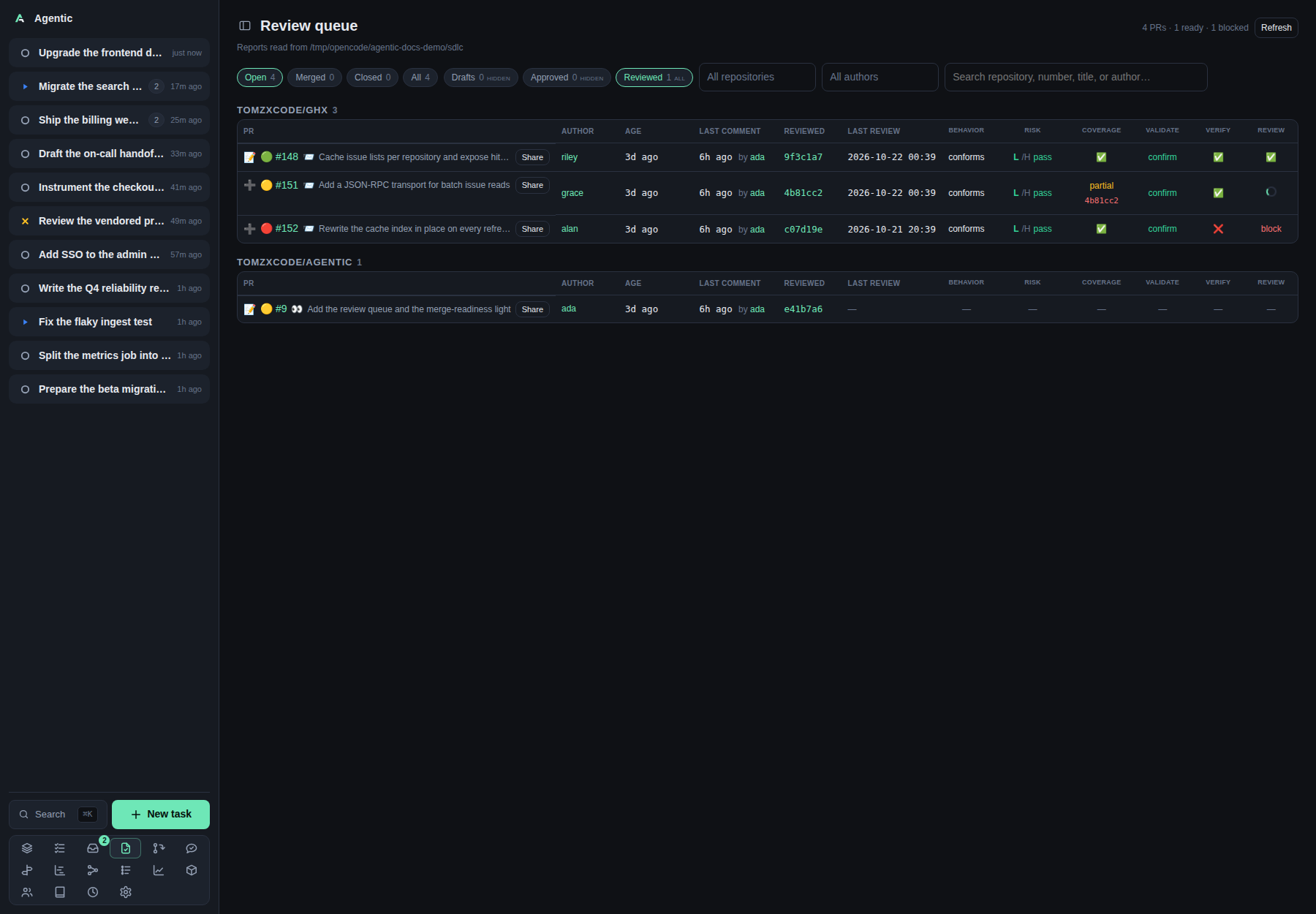
/reviews is the list of pull requests that need your review, with what each review step concluded.
Problem
A review is not one decision: it is several steps, each with its own report and its own commit, and a pull request can be waiting on you without any of them having run.
The queue puts one row per pull request, a column per review step, one shared column for the conditional surface reviews, and a merge-readiness light beside the number, so you can see what is done, what is stale, and what still blocks a merge.
It reads the reports your review skills wrote under AGENTIC_SDLC_DIR, plus the pull requests GitHub says are waiting for you.
How to use it
Where the rows come from
Two sources, merged into one list:
- The review reports in the store, at
{owner}/{repository}/pull-requests/{number}/. - The review scan, which asks ghx for the pull requests with a review requested from you or one of your teams (
review-requested:@me) and the open ones you already reviewed (reviewed-by:@me). A pull request it finds joins the queue before any report exists for it.
The scan runs after each successful ghx cache refresh, and its SLOs are configured in Settings → Review requests; its repository policy is in Settings → GitHub. Neither is on this page.
The filters
| Filter | Behaviour |
|---|---|
Open, Merged, Closed, All |
Status chips. Open is the default, and a pull request whose state could not be read counts as open. Each chip counts the whole queue. |
Team + me, Team, Me |
Who the pending review request is for. Team + me is the default and shows the whole queue, Team only the pull requests a team is still requested on, and Me only the personal ones (requested from you, or already reviewed by you). A pull request listed for both your team and you shows under Team and Me. |
Drafts |
Three states on repeat clicks: hidden (default), only, all. |
Approved |
Same three states, hidden by default: a pull request GitHub already approved needs no review from you. |
Reviewed |
Same three states, all by default: one you reviewed may still need a follow-up. |
All repositories |
A multi-select with a Filter… box and Select all / Deselect all. Nothing chosen means every repository. |
All authors |
The same multi-select over authors. |
| Search | Search repository, number, title, or author…. |
Chosen repositories and authors appear in a Selected section above each picker's list, where tapping one removes it.
The list below offers only values not chosen yet, and Select all takes the remaining options.
Status, request-scope, drafts, repository, author, and search preferences are remembered on this device under agentic.reviewQueueFilters, so leaving and returning keeps them.
A repository or author that disappears from the queue is dropped from the selection on the next load.
When a filter hides the only matching rows, the empty state names the filter and offers to include it: Include drafts, Include approved, Include reviewed, Show team and mine, plus Clear search, Clear repositories, Clear author, Show all, and Show every pull request.
Reading a row
- The number links to GitHub, shows the merge-readiness light beside it, and carries the pull request title plus the readiness text in its tooltip.
✅in the title means GitHub already approved the pull request,draftmeans it is a draft,📨means a review is requested from you or one of your teams (its tooltip says which), and👀means you reviewed it and it is still open.- A tinted row with a colored edge on its first cell means the pull request has awaited your review for longer than the SLO set in Settings → Review requests, counted from when it was last marked ready for review (or from when the scan first saw it waiting, when its timeline has no ready event). Hovering the edge explains why it is colored and states how long the pull request has waited and the SLO. Only an open pull request that still awaits your review is highlighted: one you reviewed, a draft, or a closed or merged one is not. The header adds
N past SLOwhile the filtered rows include any. - The author cell links to the person page, or to a greyed
person/newlink when no person carries that login. - Age, last comment, the commit last reviewed, and when the last review ran are beside the number.
- A pull request with no report still appears if the scan found it, and its readiness light is yellow until reports arrive.
The readiness light:
| Light | Meaning |
|---|---|
| 🟢 green | The collected signals could be approved automatically. |
| 🟡 yellow | Something still needs attention, including a pull request with no report yet. |
| 🔴 red | A signal blocks approval. |
Green needs a non-draft pull request, no stale steps, a passing review, coverage not failing, no failing surface review, an adversarial verdict that is not unproven, and a risk verdict that is not decide or investigate.
Red follows any failing step in the chain, a risk verdict of block or hold, or an adversarial verdict of breaks.
The light reads the reviewed commits, not the head commit.
The step columns
The columns are Behavior, Risk, Adversarial, Coverage, Validate, Verify, and Review, one per review step, followed by Surfaces for the conditional surface reviews.
A cell is tinted by the step's verdict: green for a pass (or a held adversarial review), red for a fail (or a reproduced break), amber for a verdict that still needs a decision (decide, investigate, partial, unproven), and blue for informational.
The cell carries no verdict text; its tooltip names the verdict and, for the adversarial review, how many failures it reproduced.
A report that does not cover the newest reviewed commit shows the commit it does cover underneath, in red.
A step that is running now shows a spinner with the time it started, even before it has written a report.
A step with no report shows a dash.
Click any cell to read that report; a large one is truncated with a note (Showing the first part of a large report.).
The surface reviews are conditional: one only runs when the diff touches its surface. The Surfaces cell therefore carries one compact token per surface that ran (CLI, SDK, API, DB), its label on a tint for its verdict, and opens its own report when clicked, since one cell can hold surfaces with different results. A report that does not cover the newest reviewed commit shows its short commit in red after the token. A pull request that touches no surface shows a dash, and a surface with no report is never counted as stale.
Actions per row
| Control | What it does |
|---|---|
➕ |
Imports the pull request into a new task, like the repository view's New task. It becomes 📝 once a task is linked, and opens the task in its PR view. |
✓ |
Approves an open, non-draft pull request on GitHub with an approving review, after a confirmation that takes an optional review comment. It is not shown on a draft, a closed or merged pull request, or one GitHub already approved. It becomes a session mark once approved; the row keeps GitHub's own review decision, which can stay unapproved while another required review is missing. |
Share |
Opens the findings selector: pick the must, should, and may findings, then Send to agent starts a run on the task with a generated prompt. The app posts nothing to GitHub; the skill does. |
Refresh |
Re-reads the store and re-asks GitHub, bypassing the ghx metadata cache. |
Every check or uncheck in Share writes include or skip onto that finding in its state file, so the selection survives a reload.
The findings come from each review step's own state file under the pull request's directory (review.yaml, validate.yaml, verify.yaml, and <skill>.yaml for the rest), not from the Markdown reports.
A Sources row narrows what is shown (All shows every step, None hides them all), without recording a decision; a finding hidden this way stays selected and is still sent.
Prompt preview shows what the agent will receive.
When no task is linked, the modal offers Import into a task instead of Send to agent.
CLI and agent interface
There is no agentic command for this page: it is a reader over files a skill writes and over GitHub.
| Operation | CLI | HTTP |
|---|---|---|
| Read the queue | none | GET /api/reviews?refresh=true |
| Read the queue for one task | none | GET /api/reviews/task/{task_id} |
| Read one report | none | GET /api/reviews/report/{number}/{name}?repository=owner/name |
| Read the findings | none | GET /api/reviews/findings/{number}?repository=owner/name |
| Record include or skip | none | POST /api/reviews/findings/{number}/decisions |
| Approve a pull request on GitHub | none | POST /api/reviews/{number}/approve |
| The scan's state | none | GET /api/reviews/scan |
| Run the scan now | none | POST /api/reviews/scan |
| Import a pull request into a task | agentic task create --github-url <url> |
POST /api/tasks |
| Send the findings to an agent | agentic run create <task> --prompt "…" |
POST /api/tasks/{id}/runs |
For an agent, the loop is: run /review-pr-full on the pull request, which writes the reports and state files, then read GET /api/reviews to see the result.
The report format is the skill's, so the queue needs no command of its own.
Related
- How to read the review queue for the walkthrough and the scan settings.
- Review scores for the 0-1 score each review step recorded over time.
- Task for the same PR panels on a task, with the agent panel that acts on them.
- Items for one pull request's reviewers and reports.
- My PRs for the pull requests you authored.
- Configuration for
AGENTIC_SDLC_DIRand theAGENTIC_REVIEW_SCAN_*keys.